

By Mark McDowellPosted: Updated: 11 min read
What Is Schema Markup And How To Add It
Schema markup is code that labels a page's facts, such as a business, its address or a product's price, in the Schema.org vocabulary, so search engines read them without guessing and can show rich results. You add it as a script in the page and test it in Google's Rich Results Test. Most business sites need organisation, LocalBusiness, Product and Article markup.
Key Takeaways
- Most answers skip the brand's own site. Over the last month Elevate, Primal's AI Visibility Tracker, logged 16,543 artificial intelligence (AI) answers across 172 queries, and a brand's own website was cited in about a quarter of them.
- Make your markup match outside sources. Most other sources were pages a brand does not control, such as marketplaces, comparison sites, government registers and Google's own Business Profile pages.
- Schema's measurable return is rich results. Google says its AI features need no special markup.
- Start with organisation, LocalBusiness, Product and Article markup. Google has retired 10 rich result features since September 2023, frequently asked question (FAQ) results among them.
- Test each template in two tools. Use Google's Rich Results Test and the Schema Markup Validator, then check Search Console after every site update.
What AI Answers Read Besides Your Own Site
Over the last month, Elevate, Primal’s AI Visibility Tracker, logged 16,543 AI answers across 172 queries about 12 brands in 12 industries. A brand’s own website was cited in about a quarter of them. A competitor’s site was cited about as often. Marketplaces and comparison sites appeared in the answers for 11 of the 12 brands. Government registers appeared for 6. Google’s own Business Profile and Maps pages were cited for more than half of the brands.
Schema markup works on the first of those sources, your own site. It states your name, address, hours, products and prices in code that machines read without guessing. Google’s guide to its generative AI features says they need no special markup. Neither Google nor Microsoft says markup on its own earns a citation. What it does well is make your site the clearest record of your facts. It also still earns rich results in Google.
Mark up your pages with the few types Google still shows. Then make sure every listing, profile and register entry matches your markup.
What Schema Markup Is
Schema markup is code that labels what a page describes, such as a shop or a product. It uses a vocabulary that search engines share. A person sees the hours under a shop photo and knows what they mean. The markup puts those hours in fields called opens and closes, so a search engine does not have to guess.
The vocabulary is Schema.org. Google, Microsoft, Yahoo and Yandex started it, and an open community now runs it. It has a type for almost anything a page can describe, from a bakery to a job opening.
Google calls the same thing structured data. Its introduction to structured data lists 3 formats. They are JSON-LD (JavaScript Object Notation for Linked Data), Microdata and RDFa (Resource Description Framework in Attributes). Google recommends JSON-LD. A JSON-LD block sits in its own script tag, so you can change it without editing what readers see.
What Schema Markup Does In Google Search
Schema markup does 2 jobs in Google. It tells Google exactly what a page is about, and it makes the page eligible for a rich result. A rich result is a listing with extra detail, such as stars, a price, stock or opening hours.
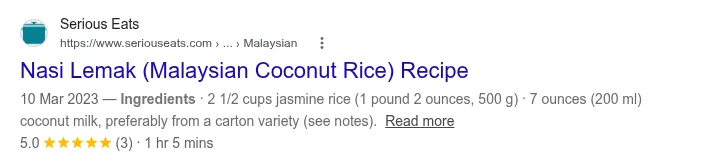
A rich result shows more of the page before anyone clicks. Google’s introduction gives examples of brands that measured a higher click-through rate (CTR) on pages shown as rich results. The capture below shows one. A search for a nasi lemak recipe shows a star rating, the number of reviews and the cooking time. Google reads them from the recipe page’s markup.
Google presents schema as a way to understand a page and to qualify for rich results. Its documentation does not describe it as a way to rank higher. Its guidelines say a manual action for spammy markup removes a page’s rich results. It does not change how the page ranks. They also say a page with valid code can still get no rich result when its content breaks a quality guideline. So add markup to state your facts exactly, and expect no change in rankings.
Which Schema Types Still Show Rich Results
Organisation, LocalBusiness, Product, Review, Article, Event, JobPosting, Recipe and video markup still show rich results in Google. FAQ, HowTo and the sitelinks search box no longer do. Google’s documentation updates log shows 10 rich result features retired since September 2023, the latest being FAQ results in May 2026.
Plenty of older guides still tell you to add FAQ markup. The table gives the status of the common types, as Google Search Central lists them.
| Markup | What Google can show | Status |
|---|---|---|
| Organisation | Logo, name, address and contact details in the knowledge panel | Shown |
| LocalBusiness and its subtypes | Opening hours, ratings and directions in the knowledge panel | Shown |
| Product (merchant listing, product snippet) | Price, stock, shipping, returns and ratings | Shown |
| Review snippet | Stars under the result | Shown, with limits on reviews a business controls |
| Article | Headline, image, author and date | Shown |
| BreadcrumbList | The site path in the result’s address line | Shown on desktop only since January 2025 |
| Event, JobPosting, Recipe, VideoObject | Event lists, job search, recipe cards, video previews | Shown |
| WebSite (site name) | The site name above the result | Shown |
| FAQPage | Questions that open under the result | Retired in May 2026 |
| HowTo | A step list under the result | Retired in September 2023 |
| WebSite with SearchAction | A search box under the result | Retired in November 2024 |
| Course info, claim review, estimated salary, learning video, special announcement, vehicle listing, practice problem | Various | Retired in 2025 and January 2026 |
Retired markup does no harm on a page. Google’s Search Central blog said that markup it does not use causes no problems for Search. It also has no visible effect. So you do not need to strip old FAQ blocks out, and new ones will not earn a rich result.
The Schema Types A Business Site Needs
Match the markup to the page it sits on. Organisation markup goes on the home page. Each outlet page gets the most specific LocalBusiness type. Product pages get Product markup, and posts get Article and BreadcrumbList markup.
| Page | Markup | What to know |
|---|---|---|
| Home page or about page | Organisation | Google asks for it on the home page or one page about the company, not on every page. Use legalName for the registered company name and sameAs for official profiles. |
| Each outlet or branch page | The most specific LocalBusiness type, such as Bakery, Dentist or AutoRepair |
Only name and address are required. |
| Product pages | Product with an Offer | Merchant listing markup is for pages where people can buy. Product snippet markup is for pages that review a product without selling it. |
| Store policy page | Return and shipping policies inside organisation markup | Google wants store-wide return policies in organisation markup. |
| Blog posts | Article or BlogPosting, with BreadcrumbList | Headline, author, image and dates. |
| Careers, events and videos | JobPosting, Event, VideoObject | Job search, event lists and video previews. |
Organisation and LocalBusiness markup can put your logo and hours in Google’s knowledge panel. The sameAs field links your markup to your profiles on other sites. Google’s guide gives a social or review profile as the example. In the same month of answers, Facebook was the most-cited social source for 8 of the 12 brands. List that page in sameAs. Give it the same name, address and phone number as your markup.
For a business with outlets, LocalBusiness markup is one part of local search engine optimisation (SEO). A Google Business Profile with the same name, address and phone number as the page is another.
Leave out stars drawn from your own reviews. Google’s review guidelines give a business page no stars when the business controls its own reviews. An embedded Google reviews widget on your own site is Google’s example.
A Worked JSON-LD Example For A Local Shop
The block below is LocalBusiness markup for a made-up bakery in Petaling Jaya called Roti Contoh (contoh is Malay for “example”). Every value is a placeholder. Swap in your own and keep each one the same as the page. Google’s guidelines say not to mark up content readers cannot see.
<script type="application/ld+json">
{
  "@context": "https://schema.org",
  "@type": "Bakery",
  "name": "Roti Contoh",
  "alternateName": "Kedai Roti Contoh",
  "url": "https://www.example.com/",
  "image": "https://www.example.com/images/shopfront.jpg",
  "telephone": "+60-3-0000-0000",
  "address": {
    "@type": "PostalAddress",
    "streetAddress": "12, Jalan Contoh 1/2",
    "addressLocality": "Petaling Jaya",
    "addressRegion": "Selangor",
    "postalCode": "46000",
    "addressCountry": "MY"
  },
  "geo": {
    "@type": "GeoCoordinates",
    "latitude": 3.10726,
    "longitude": 101.60671
  },
  "openingHoursSpecification": [
    {
      "@type": "OpeningHoursSpecification",
      "dayOfWeek": ["Monday", "Tuesday", "Wednesday", "Thursday", "Saturday"],
      "opens": "08:00",
      "closes": "20:00"
    },
    {
      "@type": "OpeningHoursSpecification",
      "dayOfWeek": "Friday",
      "opens": "08:00",
      "closes": "12:15"
    },
    {
      "@type": "OpeningHoursSpecification",
      "dayOfWeek": "Friday",
      "opens": "14:30",
      "closes": "20:00"
    },
    {
      "@type": "OpeningHoursSpecification",
      "dayOfWeek": "Sunday",
      "opens": "00:00",
      "closes": "00:00"
    }
  ],
  "sameAs": [
    "https://www.facebook.com/example",
    "https://www.instagram.com/example"
  ]
}
</script>
"@type": "Bakery"is a Schema.org subtype of LocalBusiness. Pick the closest type for your trade.- In the address,
addressRegiontakes the state,addressLocalitythe town,postalCodethe postcode andaddressCountrythe country code. telephonestarts with the country code, the way Google’s own example writes it.geoholds the shop’s latitude and longitude. Copy them from its pin on Google Maps.- Friday has 2 blocks of hours, for a shop that closes over Friday prayers.
- Sunday opens and closes at midnight, which is how Google’s local business guide marks a closed day.
alternateNameis a second trading name, here the Malay one.sameAslists the shop’s official social profiles, such as its Facebook page.
This block returns no errors and no warnings in the Schema Markup Validator. The capture below shows the validator’s result for this exact code, with each field it read.
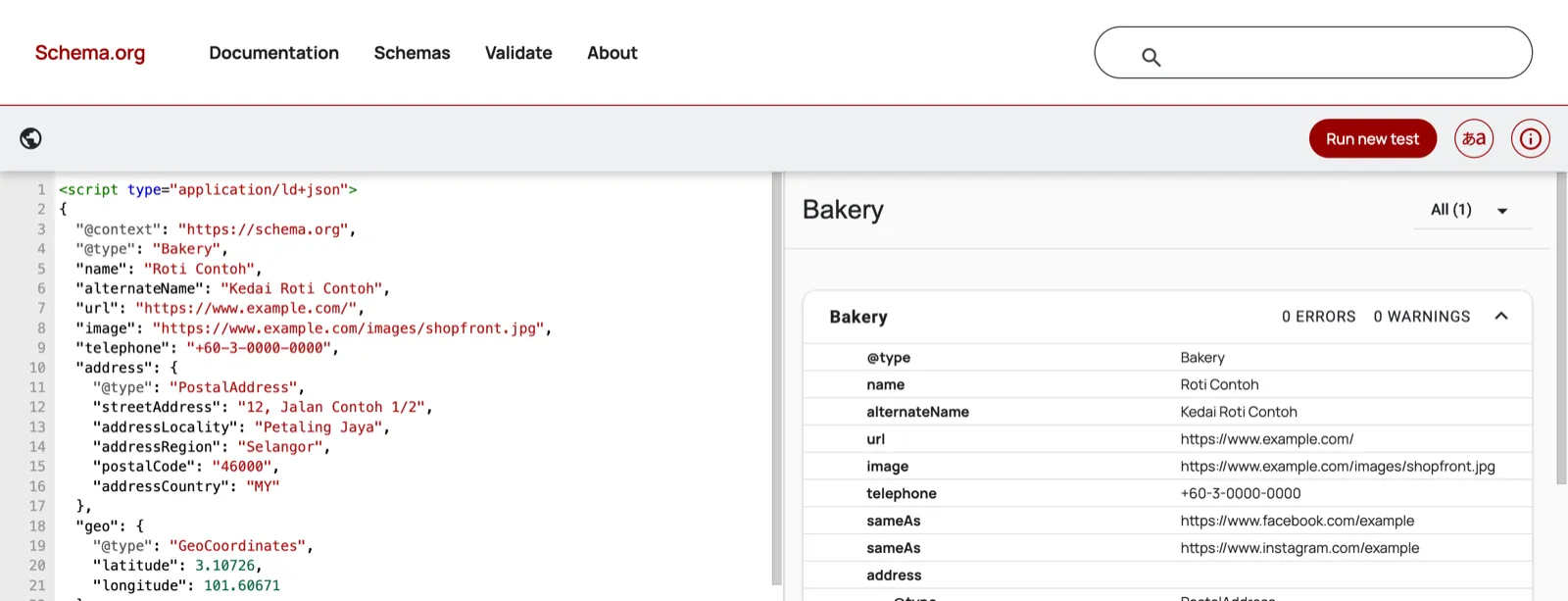
The validator checks the code against Schema.org, not against Google’s own requirements. After the page goes live, run its address through Google’s Rich Results Test as well.
A shop that sells online adds Product markup to each product page. The price is a plain number with a full stop for the decimal point. The currency code goes in priceCurrency, so no currency symbol appears in the price.
"offers": {
  "@type": "Offer",
  "price": "18.90",
  "priceCurrency": "MYR",
  "availability": "https://schema.org/InStock"
}
A store with hundreds of products should generate this markup from its product database. Then prices and stock stay correct. That work is part of ecommerce SEO.
How To Add Schema Markup And Test It
Pick the Google feature that fits the page and write the JSON-LD. Add it to the page template, then test it before and after launch.
- Find the feature that matches the page in Google’s search gallery. If nothing matches, Schema.org still has a type for the page, but the listing will look the same.
- Write the JSON-LD. Start from the example in Google’s guide for that feature, use a generator, or let your content management system (CMS) add it. On WordPress, Yoast SEO and Rank Math add organisation and article markup from their settings.
- Put the script in the page template, or add it with Google Tag Manager (GTM). Google’s guide to structured data with JavaScript says Google can read markup that appears once the page renders. It also says to fill values with GTM variables that read the page. Values typed in by hand can end up different from it.
- Test the page in 2 tools. Google’s Rich Results Test shows which Google features the page qualifies for. The Schema Markup Validator checks any Schema.org type, including the ones Google does not show.
- Check again after launch. Google’s introduction says to watch the rich result reports in Search Console, because a template change can break markup. The Performance report in Search Console also shows clicks from each kind of rich result.
Does Schema Markup Help In AI Search
Google says its AI features do not need it. Its guide to AI features such as AI Overviews says structured data “isn’t required for generative AI search”. It also says there is no special Schema.org markup you need. The same guide says markup is still worth using for rich results.
For product and local details, the guide points businesses to their product feeds and Google Business Profiles. That fits the sources in Elevate, Primal’s AI Visibility Tracker. The answers there cite pages a brand does not control. Marketplace listings, comparison sites, registers and Google’s own profile pages are among them. For technical and health topics the answers also cite document and research sites, such as Scribd, ResearchGate and PubMed.
Microsoft says schema helps. Krishna Madhavan is a principal product manager at Microsoft Bing. He wrote that “Schema is a type of code that helps search engines and AI systems understand your content”. Microsoft Copilot uses Bing’s index.
I would measure schema where it can be measured, in Google’s rich results. For AI answers, work on the content and profiles the assistants read. That is the work of AI search visibility.
Common Schema Markup Mistakes
Schema markup goes wrong when the code says something the page does not, or when 2 tools write the same block twice. Check for these before a template goes live.
- Hours, prices or a phone number in the code that differ from the page. Google’s guidelines say markup must describe what readers can see.
- Required properties left out. Google says items without them cannot get a rich result.
- Stars from your own reviews on your own business page, which Google leaves out of review snippets.
- A theme and a plugin each adding an organisation block, so the page describes the business twice with different details.
- Dates written day first. A Schema.org date runs year, month, day.
- FAQ or HowTo markup added for a rich result Google no longer shows.
- Markup that gives a different name, address or phone number from your Google Business Profile or marketplace stores. Those are pages AI answers cite next to your own site.
Where To Start
Start with organisation markup on the home page. Next, add LocalBusiness markup to each outlet page, with the bakery example as the pattern. Add Product markup if you sell online and Article markup on your posts. Then check your Google Business Profile, marketplace stores and any register entry. Each should give the same name, address and phone number as the markup. Test every template, and look at Search Console after each site update. At Primal, adding and checking structured data is part of the technical SEO work our Kuala Lumpur office does.
Frequently Asked Questions About Schema Markup
How do I know if my website has schema markup?
Paste a page address into the Schema Markup Validator. It lists every Schema.org block on the page, with any errors and warnings. Google’s Rich Results Test shows which Google features the page qualifies for. Search Console reports on the whole site.
Is schema markup a ranking factor?
Google does not describe it as one. It presents structured data as a way to understand a page and to qualify for rich results. Its guidelines say even a manual action for spammy markup only takes away rich results. The page’s ranking stays the same.
Should I remove FAQ schema now that Google has retired the rich result?
You do not need to. Google has said structured data it does not use causes no problems for Search. Microsoft’s guide to AI search answers lists FAQ among the labels schema can give content. Other systems may still read it.
Do I need a developer to add schema markup?
Not for organisation, article, breadcrumb or local business markup on most sites. A CMS plugin or a Google Tag Manager tag covers those. On a large store, Product markup is best made from the product database. That usually needs a developer.
Which schema markup should a small business add first?
Organisation markup on the home page, then LocalBusiness markup on each outlet page. Google needs only a name and an address for local business markup. Add opening hours, a phone number and map coordinates too, since Google recommends them.
Founder and Chief Executive Officer
Mark McDowell is the Founder and Chief Executive Officer of Primal, which he started in Bangkok in 2015. He is on the Forbes 30 Under 30 Asia 2020 list and was Campaign Asia’s Southeast Asia Young Achiever of the Year in 2018. He writes about AI search and search engine optimisation.
About The Author