
By Mark McDowellPosted: 12 min read
AI Search Readiness Checklist And How To Test Each Item
AI search readiness means AI tools can tell who your business is, reach your pages and are allowed to quote them. Google requires a page to be indexed, able to show a snippet and included in Search Console's Search generative AI control, and ChatGPT and Perplexity need their own crawlers let through robots.txt and your firewall. Each check below takes minutes with a browser or Search Console.
Key Takeaways
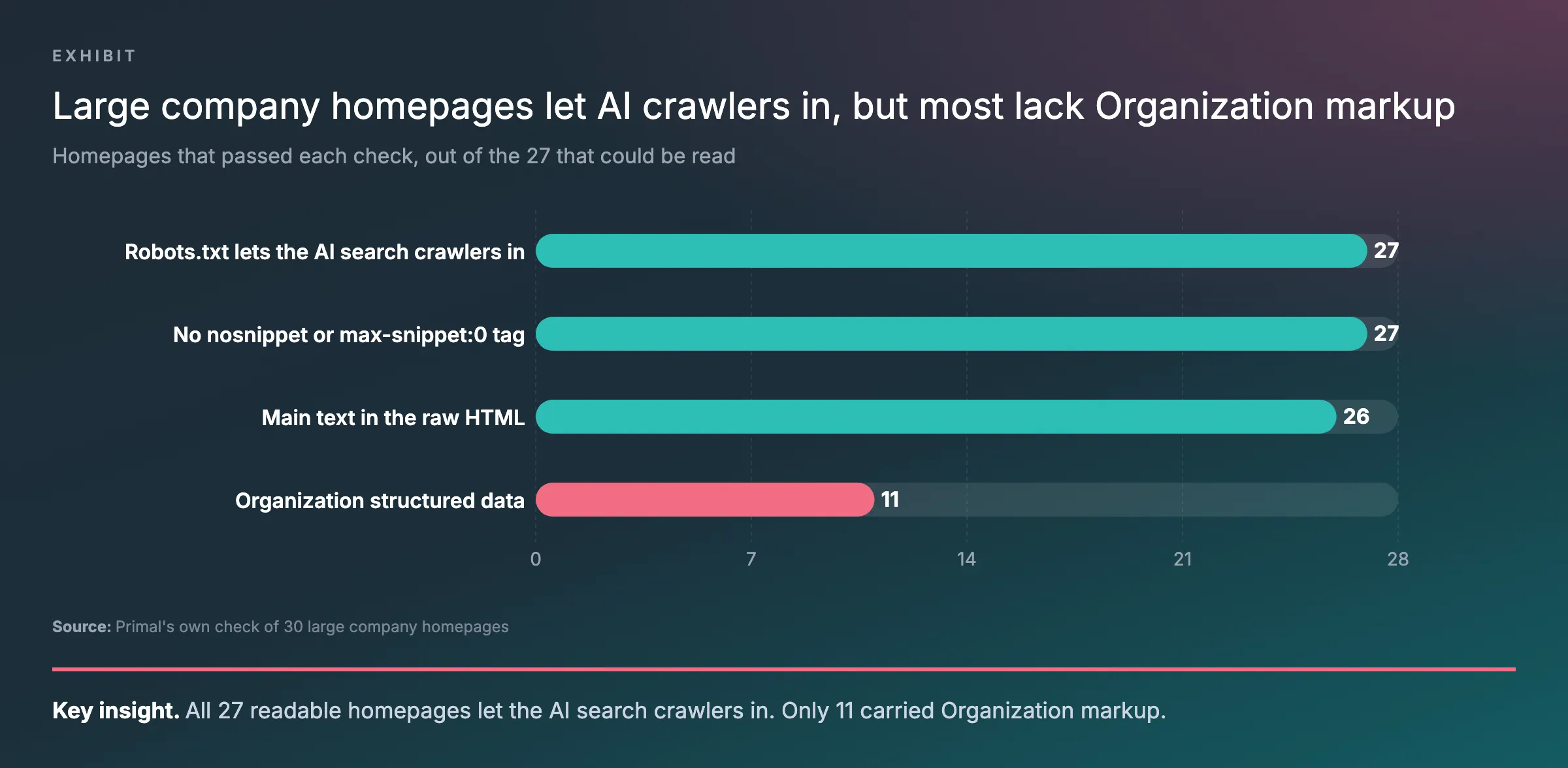
- Most homepages checked lacked Organization markup. In Primal's own check of 30 large company homepages, all 27 it could read let the AI search crawlers in, and only 11 carried Organization markup that states who the company is.
- Check your listings elsewhere first. In 16,543 AI answers about 12 brands in 12 industries logged by Elevate, Primal's AI Visibility Tracker, over the last month, a brand's own website was cited in about a quarter of the answers about it.
- Google's AI features need indexed pages. Google says a page must be indexed and able to show a snippet to appear in AI Overviews or AI Mode, and the site must be included in Search Console's Search generative AI control.
- Set OpenAI's two crawlers separately. OpenAI's crawler documentation says GPTBot collects content for model training and OAI-SearchBot decides whether a site appears in ChatGPT search.
- AI crawlers miss text that scripts add. A study by Vercel and MERJ found that the major AI crawlers it measured do not run JavaScript, so text added after the page opens is missing for them.
What AI Search Readiness Means
AI search readiness is whether artificial intelligence (AI) tools can tell who your business is, reach your pages and quote them.
Over the last month, Elevate, Primal’s AI Visibility Tracker, logged 16,543 AI answers about 12 brands in 12 industries. A brand’s own website was cited in about a quarter of the answers about it. Much of the rest came from the places buyers compare and check. Those include marketplaces, review sites, government registers, publishers and Facebook.
This month Primal ran four of the checks below on the homepages of 30 large listed companies. Every homepage it could read let the AI search crawlers in. Most of them had a different gap. They had no code that tells a machine who the company is.
So I start readiness with who you are, on your own site and on the sites AI answers cite. Then I confirm that the crawlers can reach your pages and that Google may show them. Last comes the page itself, and whether it says something worth quoting.
Google’s own requirement is short. Its page on AI features and your website sets two conditions for a link in AI Overviews or AI Mode. The page must be indexed, and it must be able to show a snippet. There are no extra technical steps. Its guide to generative AI features in Search adds one setting. The site must be included in the Search generative AI control in Search Console.
Outside Google, each assistant sends its own crawler. OpenAI’s crawler documentation says OAI-SearchBot decides whether a site can appear in ChatGPT search answers. Perplexity uses PerplexityBot, and Microsoft Copilot finds pages through Bing. Our guide to what AI search is covers how each platform finds its pages.
The AI Search Readiness Checklist
Run these 12 checks on your homepage and on the 5 to 10 pages that bring in the most enquiries. Most tests take a few minutes in a browser or in Search Console.
| # | Check | Where to test it | Pass when |
|---|---|---|---|
| 1 | Listed where AI answers look | Ask your buyers’ main questions in ChatGPT and in Google, then open the sources cited | You have a current listing on each marketplace, review site or register that comes up |
| 2 | Business details match | Google Business Profile, Bing Places, your listings and your contact page | Same name, address, phone number and opening hours everywhere |
| 3 | Homepage states who you are in code | Google’s Rich Results Test or the Schema Markup Validator | An Organization item with no errors, its name, logo and contact details matching the page |
| 4 | Search crawlers allowed in robots.txt | yoursite.com/robots.txt in a browser | No Disallow line covers your pages for Googlebot, Bingbot, OAI-SearchBot, PerplexityBot or the * group |
| 5 | Firewall lets search crawlers through | Your content delivery network (CDN) or host’s bot settings, or the server logs | Search crawlers are set to Allow, and recent visits received the page |
| 6 | Page indexed in Google and Bing | URL Inspection in Search Console and in Bing Webmaster Tools | “URL is on Google”, and Bing reports the page as indexed |
| 7 | Snippets allowed | Search Console, URL Inspection, View crawled page | No nosnippet, no max-snippet:0 and no data-nosnippet on the main text |
| 8 | Search generative AI control on | Search Console, Settings, Search generative AI | Include, or Inherit from a parent set to Include |
| 9 | Main text in the raw HTML | View source in Chrome | Your first paragraph and your prices or opening hours appear in the source |
| 10 | Author shown | The page itself | A byline that links to a page about the author |
| 11 | Something only you can say | The top 3 results for the page’s main question | Your page has a fact, figure, photo or step that none of them has |
| 12 | Baseline recorded | Search Console’s Generative AI report and Bing’s AI Performance report | AI impressions for your main pages are written down with the date |
The first three checks are about who you are. They come first because that is where the large sites fell short. The next five decide whether AI tools can use your page at all. The last four decide whether the page is worth quoting, and whether you will know later which fix worked.
I cover the same ground in a video on my YouTube channel, for readers who would rather watch.
My video on how to optimise a whole site for AI search, from my own YouTube channel.
How 30 Large Company Websites Scored
The large sites Primal checked passed the access checks and fell short on Organization markup. Primal ran 4 of the checks on the homepages of 30 large listed companies. Each test could be completed on 27 of them.
All 27 let Googlebot, Bingbot, OAI-SearchBot and PerplexityBot reach the homepage, and none blocked GPTBot. All 27 allowed snippets. In 26, most of the visible text was already in the first response. A crawler that skips JavaScript would still read it. Only 11 of the 27 carried Organization markup.
Side by side, the four results show how far the markup check trails the three access checks.
On the sites we could not read, our browser met a browser-check page, a refused request or a timeout. A firewall can treat a real AI crawler differently from our browser. Only each site’s own team can tell from its logs whether the crawlers get through.
Can AI Tools Tell Who You Are
1. You Are Listed On The Sites AI Answers Cite
AI answers draw on marketplaces, review and comparison sites, registers and publishers as well as a business’s own pages. When a buyer compares options, those sites carry much of the answer.
Across the answers logged by Elevate, Primal’s AI Visibility Tracker, a marketplace, comparison or listing site was cited for 11 of the 12 brands. A government register or regulator was cited for 7 of them. Facebook was the most-cited social platform for 8, so treat your Facebook page as a listing too.
To test, ask the questions your buyers ask, in their words, in ChatGPT and in Google. Open the sources each answer cites and write them down. Do this for 5 to 10 questions. The sites that come up more than once are the marketplaces, review sites, registers and publishers of your trade.
A pass is a current listing on each of those sites. It should show the right name, what you do, where you work and recent reviews. I would fix a missing listing before any page on the site, because the answers already look there.
2. Your Business Details Match Everywhere
Google’s AI features page asks site owners to keep their Google Business Profile up to date. In the answers logged by Elevate, Primal’s AI Visibility Tracker, Google’s own Business Profile and Maps results were cited for more than half of the 12 brands. Search your business name on Google. Compare the profile panel with your contact page and your listings. A pass is the same name, address, phone number and opening hours in each. Check Bing Places too, if you use it. For a business with a shop or office, these listings are the core of local SEO, short for local search engine optimisation.
3. Your Homepage States Who You Are In Code
Structured data is code in a page, usually in JSON-LD format, that states facts such as your business name and address. Organization markup is the type that says who the company is. It gives one entity one name, one logo and a set of official profiles. Paste the homepage into Google’s Rich Results Test or the Schema Markup Validator. A pass is an Organization item with no errors, its name, logo and contact details matching what the page shows.
Google’s guide says structured data is not required for its generative AI features. Its AI features page still asks that any structured data match the text a visitor sees. I would add Organization markup anyway. It is the one place your own site states who you are in a form any crawler can read.
Do You Need Other Platforms As Well As Your Website
Yes, you need both. Your own page is what an assistant quotes when it explains something. Marketplaces, review sites and your Facebook page are where it looks when a buyer compares options.
Customers often ask us if we are “essentially saying we shouldn’t be focusing just on the website, but more on other platforms”. My answer is to start with the listings, since the answers already go there. Then make your own page worth quoting.
Can AI Crawlers Reach Your Pages
4. Robots.txt Lets The Search Crawlers In
AI search crawlers can reach your site when your robots.txt file does not block them. Open yoursite.com/robots.txt in a browser to check.
Each group of lines starts with a User-agent line. A crawler follows the group with its own name, or the * group when it has none. A page passes when no Disallow line in that group covers it.
Check the search crawlers first. Set the training ones by your own policy. OpenAI’s documentation says GPTBot collects content to train its models, while OAI-SearchBot decides whether you appear in ChatGPT search answers. Blocking one leaves the other alone. OpenAI also says a change to robots.txt takes about 24 hours to reach ChatGPT search.
Two of the robots.txt files in Primal’s homepage check listed AI crawlers by name to let them in. Neither listed OAI-SearchBot. Both still passed through their * group. The lists show how easy the two OpenAI crawlers are to mix up.
5. Your Firewall Lets Them Through
A firewall can turn AI crawlers away even when robots.txt lets them in. Robots.txt asks a crawler to stay out. A firewall stops it at the server. Google’s AI features page says crawling should be allowed both in robots.txt and by any CDN or hosting set-up.
If your site runs through Cloudflare, start there. Its documentation on blocking AI bots says new domains now block Training and Agent bots on pages that show ads. Search bots stay allowed. A crawler used for both search and training is blocked by any setting that blocks AI training.
The capture below is that Cloudflare page. It shows the new defaults and the three bot classes, so you know which setting to look for.
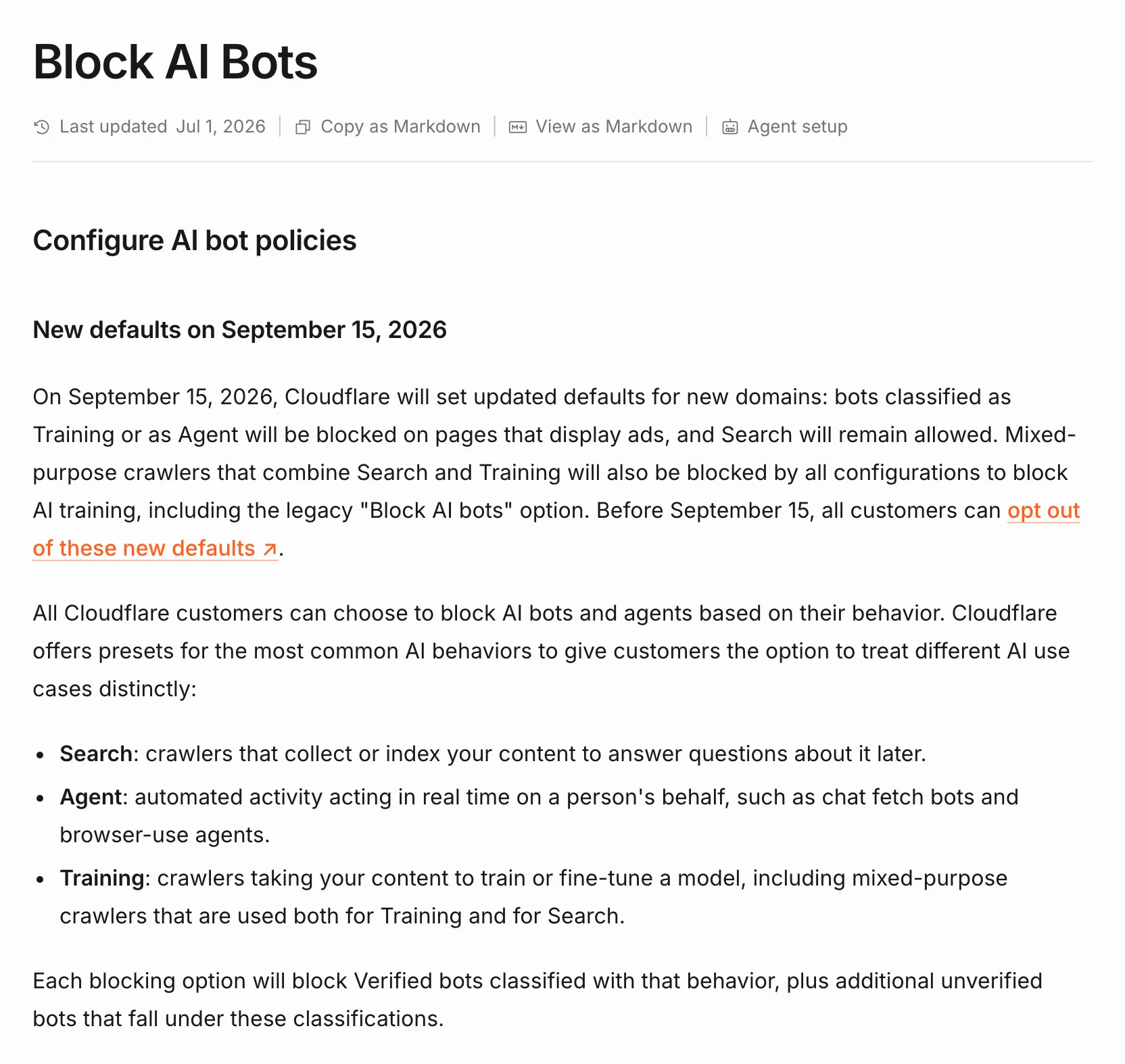
To test, open the security settings in Cloudflare and find the AI bot policies. The page passes when Search is set to Allow. On another host or a security plugin, ask your developer to search the server logs for OAI-SearchBot and PerplexityBot. A pass is a recent visit from each that got the page, with no block or challenge.
6. Google And Bing Have Indexed The Page
Paste the page address into URL Inspection in Search Console. A pass reads “URL is on Google”. Any other result gives the reason, such as a noindex tag, and that reason is the fix. Microsoft Copilot finds pages through Bing, so run the same test in Bing Webmaster Tools. You can import your sites there from Search Console.
Can Google Show The Page In Its AI Features
7. The Page Can Show A Snippet
Four tags limit what Google shows from a page, in its AI features too. Google’s AI features page lists them as nosnippet, data-nosnippet, max-snippet and noindex. A tag added years ago to hide a description can keep a page out of AI Overviews today.
In URL Inspection, open View crawled page and search the HTML for “nosnippet” and “max-snippet”. The More info tab shows the response headers. An X-Robots-Tag line there can carry the same instruction. A page passes with no nosnippet, no max-snippet:0 and no data-nosnippet around the main text.
8. The Search Generative AI Control Is Set To Include
Google’s help page for the Search generative AI control gives three choices. Include is the default. Exclude takes your links and content out of AI Overviews, AI Mode and the AI features in Discover. Inherit follows the setting of a parent property.
Google’s help page for the control gives the wording of each choice, which you can match against what Search Console shows you.
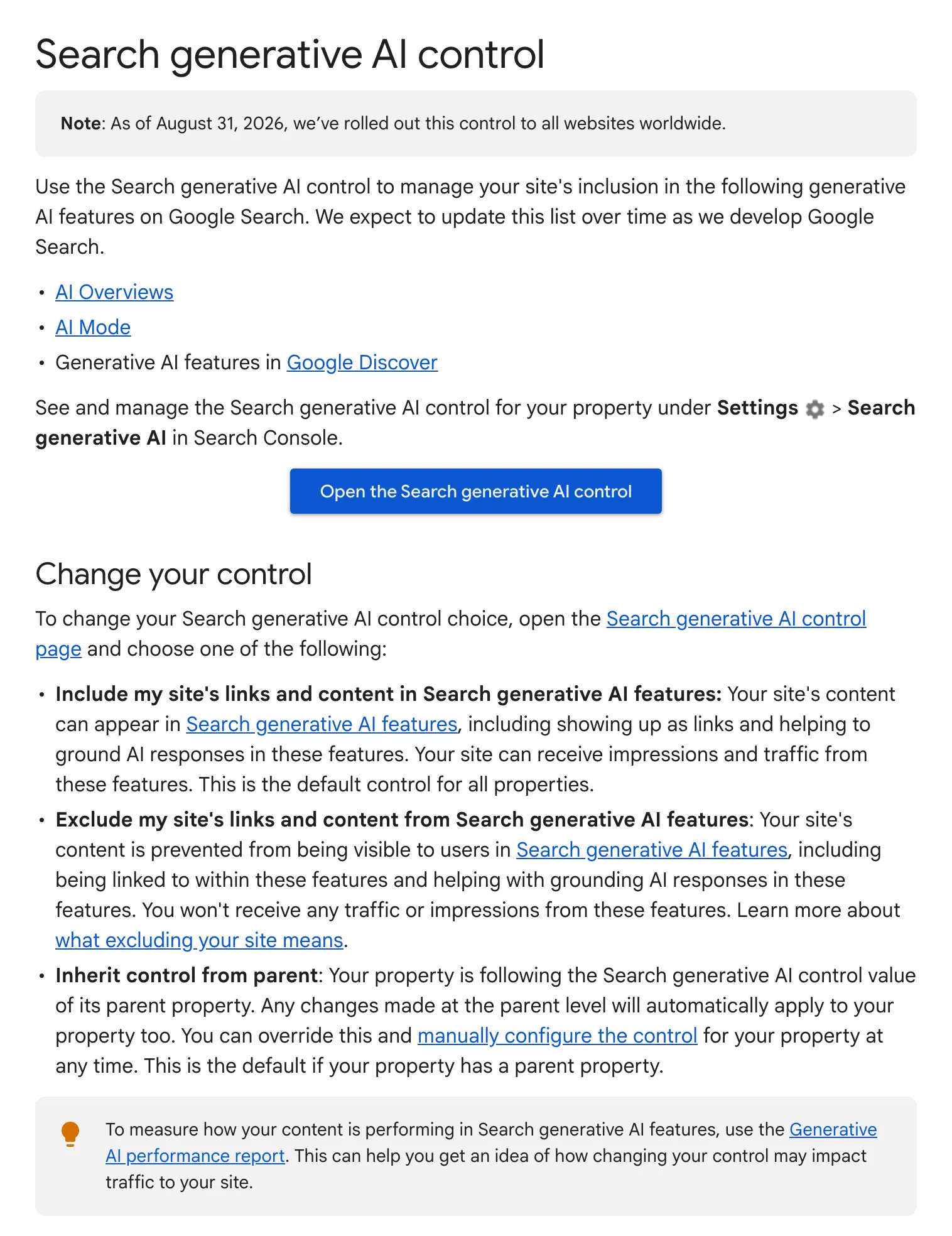
Open Search Console, then Settings, then Search generative AI. A pass is Include, or Inherit from a parent property set to Include. Check each property you own. A property for one folder can override the setting for the whole domain.
Can AI Crawlers Read And Trust The Page
9. The Main Text Is In The HTML
Most AI crawlers do not run JavaScript, so text that a script adds after the page opens is missing for them. Vercel, a website hosting company, studied AI crawler visits with the consultancy MERJ.
Its study found that none of the major AI crawlers it measured ran JavaScript. That includes OAI-SearchBot, GPTBot, ClaudeBot and PerplexityBot. Gemini uses Google’s own crawling, which does run it.
To test, open the page in Chrome and view the source with Ctrl+U, or Option+Command+U on a Mac. Search the source for your first paragraph and for one price or your opening hours. The page passes when both are there. Look hardest at tabs, sliders, review widgets and price tables, which a script often fills in after the page opens.
10. The Page Says Who Wrote It
Google’s page on creating helpful content asks if it is clear who wrote a page. It also asks if bylines lead to more about the author. That is part of what Google calls E-E-A-T, short for experience, expertise, authoritativeness and trust. Open 5 of your main articles or guides. Each one passes with a byline that links to a page about the author and their work.
11. The Page Has Something The Top Results Do Not
Google’s guide calls this non-commodity content, meaning first-hand experience and views that go past common knowledge. Search Google for the main question the page answers and open the top 3 results. Note what each one says. Your page passes when it has a fact, figure, photo or step from your own work that none of them has.
Record A Baseline Before You Change Anything
Write down where you stand before you fix anything, or you will not know which fix worked. Google’s guide points site owners to the Generative AI performance report in Search Console. It shows impressions from Google’s AI features by page. Bing Webmaster Tools has an AI Performance report for Copilot citations.
A pass is a dated record of the AI impressions for your main pages, ready to compare with next month. Our guide to measuring AI search visibility covers both reports.
What To Fix First
I would fix the checks in the order of the table. Who you are comes first, since that is where the large sites fell short and where the answers look. The access checks come next, because a firewall block or an Exclude setting cancels every other fix. Most access fixes take one setting.
Then I would check the HTML on the pages that carry prices, services and contact details. Those hold the facts I most want an AI answer to get right. The page checks after that are ongoing work on each page that matters.
Primal started in 2015 and has offices in Kuala Lumpur, Bangkok and Singapore. Our AI SEO team works on getting brands cited in AI Overviews, AI Mode, ChatGPT, Gemini and Perplexity.
Frequently Asked Questions About AI Search Readiness
Do I need an llms.txt file to be ready for AI search?
Not for Google. Google’s guide to its generative AI features says Google Search does not use llms.txt files or other files made only for AI.
Does blocking GPTBot remove my site from ChatGPT?
No. OpenAI’s crawler documentation says GPTBot collects content to train its models, while OAI-SearchBot decides whether a site appears in ChatGPT search answers. You can block one and allow the other.
Does schema markup make a page ready for AI search?
It helps, but Google says structured data is not required for its generative AI features. Google does ask that any structured data match the visible text on the page. Organization markup on the homepage is the one I would add first.
How do I know if my site is excluded from AI Overviews?
Open Search Console, then Settings, then Search generative AI. Check whether the property says Include, Exclude or Inherit. Then inspect a page with URL Inspection and look for nosnippet or max-snippet:0. Either one can keep a page out of AI Overviews.
How often should I run the AI search readiness checklist?
Run it once now, then again after a redesign, a change of host or platform, or a change to firewall settings. Each of those can change robots.txt, snippet tags or bot settings without anyone meaning to. Keep the dated baseline so you can compare each run with the last.
Founder and Chief Executive Officer
Mark McDowell is the Founder and Chief Executive Officer of Primal, which he started in Bangkok in 2015. He is on the Forbes 30 Under 30 Asia 2020 list and was Campaign Asia’s Southeast Asia Young Achiever of the Year in 2018. He writes about AI search and search engine optimisation.
About The Author