

By Mark McDowellPosted: 10 min read
Ecommerce SEO Guide For Getting Your Products On Google
Ecommerce SEO is the work that gets a store's category and product pages chosen by Google and AI assistants when people search for what it sells. Any good guide to it comes down to five jobs: give each search one page, let Google index only the URLs worth showing, write product pages no other store has, send Google a product feed, and get the store onto the lists assistants quote.
Key Takeaways
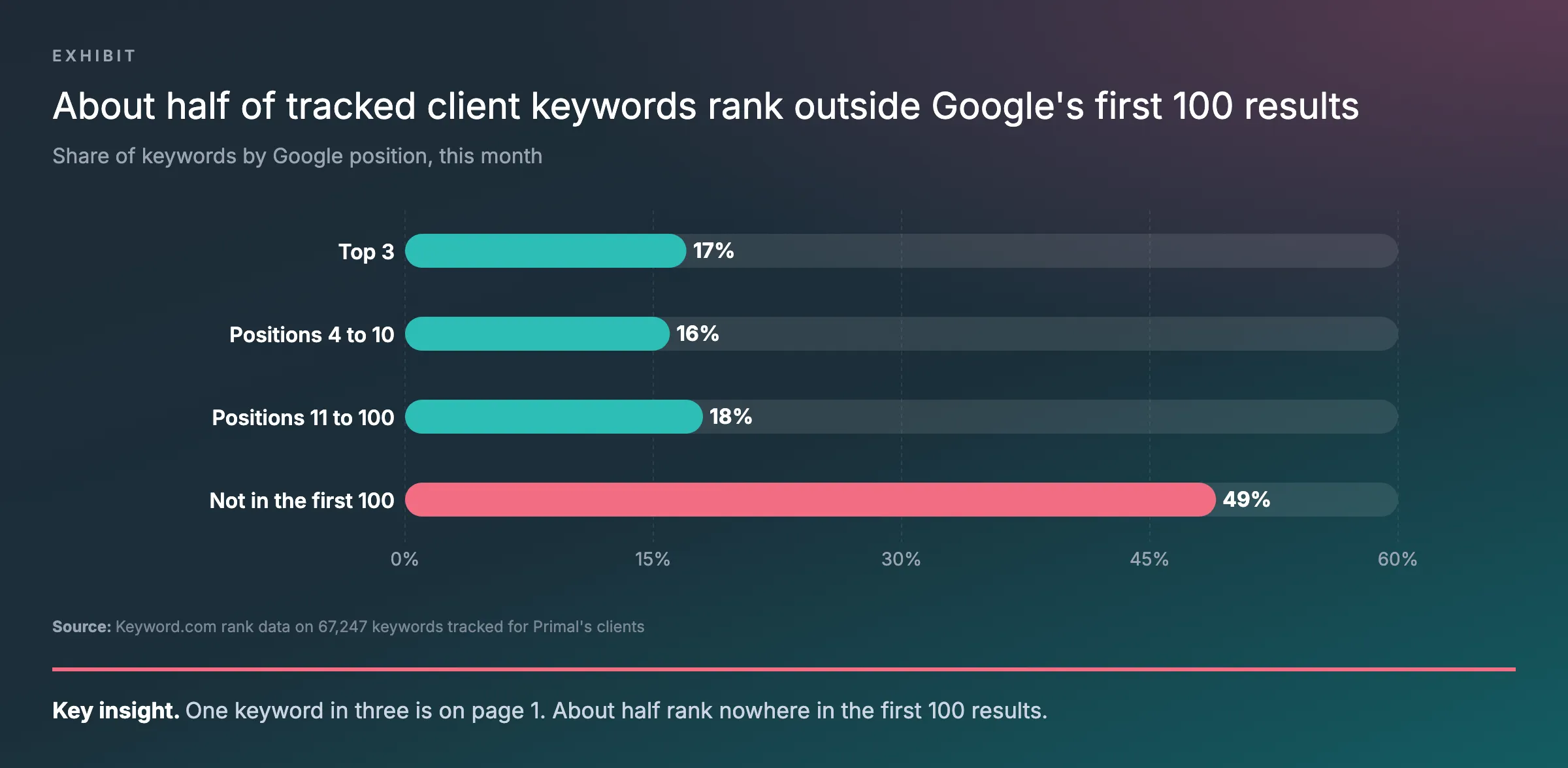
- Stores gain most by choosing which pages rank. Across the 67,247 keywords tracked in Keyword.com for Primal's clients this month, one in three is on page 1 and about half rank nowhere in the first 100 results.
- Each search needs one page on the site. That is a category page for a group of products, a product page for one model and a guide for a question.
- Block the filters nobody searches for. Google's faceted navigation guide warns that filter URLs can multiply without limit, so give the filters people do search a fixed URL.
- Google Shopping needs a product feed. The Shopping tab takes it through Google Merchant Center, while structured data on the page is optional for Google Search.
- Stores also need marketplace and comparison listings. Elevate, Primal's AI Visibility Tracker, logged 16,543 AI answers about 12 brands in 12 industries over the last month, and a brand's own site was cited in only about a quarter of them.
What Ecommerce SEO Is
Ecommerce search engine optimisation (SEO) is the work that gets a store’s category and product pages chosen when people search for what it sells. Google and the artificial intelligence (AI) assistants show only a few pages for each search. Most of what a store publishes never gets picked.
Across the 67,247 keywords tracked in Keyword.com for Primal’s clients this month, 17% sit in the top 3 results, 16% in positions 4 to 10, 18% between 11 and 100, and 49% nowhere in the first 100. A store feels this more than most sites, because it makes so many URLs, or page addresses. One shoe in 4 sizes and 3 colours is already 12 variants, before a single filter is added.
The chart shows that spread across every keyword in the set. It is the reason this guide starts with choosing which pages should rank.
So the job is to pick the pages that deserve to rank. Then make each one the best answer for its search. The other URLs stay out of Google’s way. Then the store needs a place on the lists that AI assistants quote when someone asks which business to choose.
How To Match Each Search To One Page
Give every search one page on your site, and only one. When two pages target the same search, you leave the choice to Google. A keyword map stops that. It is a sheet with one row per search, the search intent behind it and the page that should rank for it.
| Search | What the person wants | Page that should rank |
|---|---|---|
| running shoes | To browse a kind of product | The running shoes category |
| women’s trail running shoes | A narrower set of products | A subcategory, or a filtered page with its own URL |
| a brand and model name | One product, often ready to buy | That product page |
| how to choose running shoes | Advice before buying | A buying guide that links to the categories |
Start your keyword research with the searches you already get. The Performance report in Google Search Console lists them, and your site search log shows the exact words customers type. Searches for a group of products go to category pages, and searches for one model go to product pages. Questions go to guides that link to both. Point your internal links at the page each search belongs to. Any search with no page yet is a candidate for a new category or a new guide.
Which Store URLs Google Should Index
Let Google index the pages people search for, and keep the rest out. A store has far more URLs than products, because filters, sort orders and variants each create new addresses. Google’s page on faceted navigation says filter URLs can create “infinite URL spaces”. Crawlers spend time on them before they can tell they are useless.
Start with the site structure. Google’s ecommerce guides ask for plain links from the menu to each category. Categories link to subcategories, and those link to every product. Googlebot does not usually type into a search box, so a product that only site search can find may never be crawled. The links need to be standard <a href> links, because Google may not follow menus that run on JavaScript.
Then look at the URLs themselves. Google’s guide to ecommerce URL structure asks for plain words in the path, such as /running-shoes/trail/, and parameters written as ?key=value. Each variant gets its own URL. When the variant sits in an optional parameter, its canonical tag points to the URL without it. Google then reads the variants as one product.
| URL type | Example | What to do |
|---|---|---|
| Category page | /running-shoes/ |
Link it from the menu, give it a canonical tag that points to itself, and list it in the sitemap |
| Filtered page that people search for | /running-shoes/trail/ |
Let Google index it, keep the filter order fixed, and return a 404 when it has no products |
| Filter or sort order nobody searches for | ?sort=price |
Block crawling in robots.txt, or keep it out of the index with noindex |
| Page 2 onwards of a category | ?page=2 |
Give each page its own URL and its own canonical tag, never one that points at page 1 |
| Product variant | /t-shirt?size=m |
Give it a URL, with the canonical tag on the main product URL when the parameter is optional |
| Empty category | A category with no products | Add noindex, and return a 404 if it leaves the navigation |
| Product out of stock for now | The product URL | Keep the page live and mark it out of stock on the page and in its structured data |
| Product gone for good | The product URL | Redirect it to a close replacement, or return a 404 or 410 |
The rows come from Google’s URL structure guide, its faceted navigation page and its pagination guide. The stock rows draw on its advice on pausing an online business and its crawling errors guide.
I would fix the filter and sort rows first. Google’s own page says those URLs can multiply without limit, so they waste the most crawling. The Page indexing report in Search Console shows what Google has already indexed. Compare it with the table and decide what stays.
How To Write Category And Product Pages
Write the product page no other store can copy. The manufacturer’s description is open to every seller of the same item.
Google’s ecommerce guides ask for descriptions in the words shoppers use. They also ask for reviews and clear delivery and returns policies.
Each product page needs these parts:
- a name with the details people search for, such as brand, model, size range and colour
- a description your store wrote, saying what the product is for and who it suits
- specifications in a table, and what comes in the box
- customer reviews on the page
- price, stock, delivery cost and the returns policy written as text
- photos with plain file names and alt text, compressed so they open fast on a phone
A category page needs a heading that matches the main search and a short introduction that helps a shopper choose. It links to its subcategories and its buying guide. The products most people want sit at the top of the grid.
Then add Product structured data to every product page, with the price and stock in an Offer. Google’s page on sharing product data says structured data is not required to appear in Google Search. It does make a page eligible for product rich results. It also helps Google read the price, discount and delivery cost correctly. Our guide to schema markup covers which types to add and how to test them.
How To Get Products On The Shopping Tab
The Shopping tab needs a product feed sent through Google Merchant Center. Structured data on the page can help that feed, but it cannot put a product on the tab by itself. Product rich results in Google Search can use either source.
The capture below is Google’s own table of which data each result uses. Its Shopping tab row is the reason a store needs a feed as well as structured data.
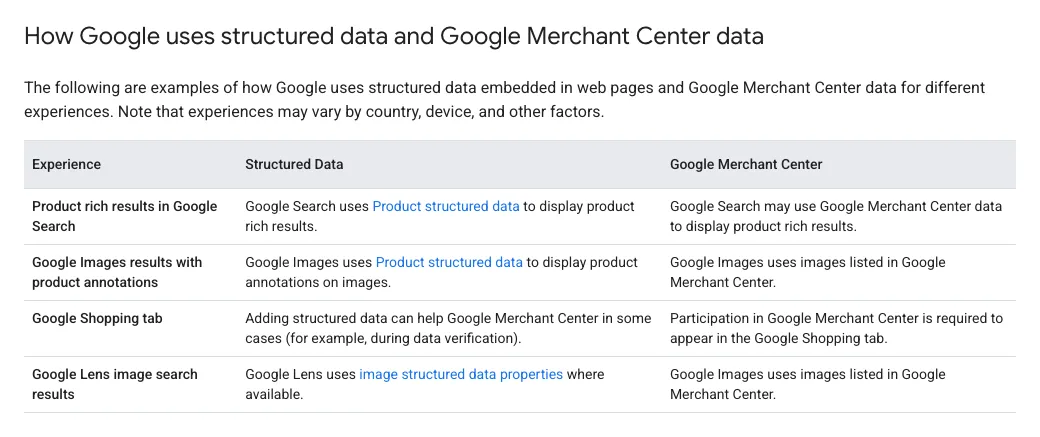
A feed also gives you more control than crawling. Google’s page says crawling may miss products. A feed can be updated as often as every hour, which suits stock that changes during the day. Smaller stores can start with an automatic feed that Google creates from crawled pages. Structured data makes that feed more accurate.
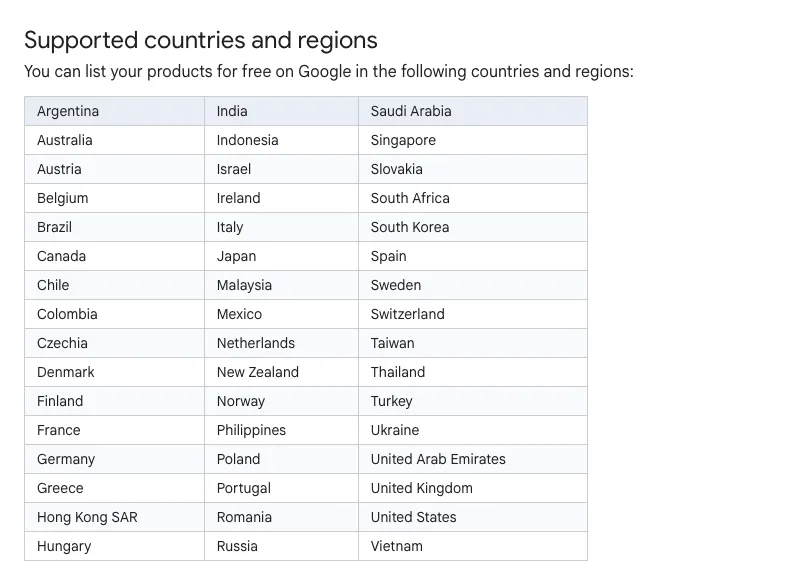
Listing a product can cost nothing. Google’s help page for stores on Shopify lists 48 countries and regions where products can be shown on Google at no charge. Malaysia, Singapore, Thailand, Indonesia, the Philippines and Vietnam are all on it. Products synced through the Google & YouTube app on Shopify are opted in, though Google does not promise to show them.
The capture below is that country list from Google’s help page. Check your own market on it before you set up a feed.
How A Store Shows Up In AI Recommendations
SEO can help, and much of the work happens on other sites. When someone asks an assistant about a business, the answer leans on pages other people publish. Those are marketplaces, comparison sites and reviews.
Over the last month Elevate, Primal’s AI Visibility Tracker, logged 16,543 AI answers about 12 brands in 12 industries. A brand’s own website was cited in only about a quarter of the answers about it. Marketplaces or comparison sites appeared in the answers for 11 of the 12 brands, with Shopee and Lazada among them. Facebook pages and Google’s Business Profile results also appeared for most of the brands. Keep both as complete as the site.
For a store, the lists are marketplaces, review sites, publishers’ buying guides and the brand pages that list official retailers. Ask every brand you stock to add your store to its retailer page. Keep your marketplace listings complete, with the same product names and details as your own site. Then publish buying guides that answer one common question each, plainly. That gives an assistant a page of yours to cite when someone asks how to choose.
The same pages are where a store earns links. Our guide to getting backlinks covers the methods.
What Shopify Handles And What It Leaves To You
Shopify does much of the technical setup for you, and leaves the content and the choices to you. Its help page on SEO says it adds canonical tags by itself and makes the sitemap and robots.txt files. It also turns on Secure Sockets Layer (SSL) certificates by default. Its themes include product schema markup, so price, reviews and stock can show in search results.
You still write the title tag, meta description and URL of every product and collection. Shopify recommends title tags under 60 characters. You write the alt text, and you set up 301 redirects when a product’s URL changes or a product is dropped. Shopify calls its categories collections.
- Open a variant URL and check that its canonical tag points to the main product URL.
- Find which collection filter URLs Google has indexed, and decide against the table above which should stay.
- Replace the manufacturer descriptions on your best selling products first.
- Connect the Google & YouTube app if you want products on the Shopping tab.
What To Do During A Platform Migration
Keep the SEO work going through a migration, and plan the URLs before the switch. Product copy, category pages and guides go with the store to the new platform. The URLs are the part that needs care.
List every product, collection and guide URL on the old site, with its clicks from Search Console beside it. Map each one to its new address and set a 301 redirect, as Shopify’s help page asks whenever a URL changes. Keep the same URL wherever the new platform allows it. Then watch the Page indexing report in the weeks after launch.
I made this video for my YouTube channel. It answers whether a site keeps its rankings through a rebrand or a new domain or platform.
How To Measure Ecommerce SEO
Measure each page type on its own, and measure revenue as well as rank. A rank report says little on its own.
In the Search Console Performance report, filter for your category paths and then your product paths. On Shopify those are /collections/ and /products/. Compare the clicks for each. In Google Analytics 4 (GA4), watch revenue from organic search by landing page. A category page with many clicks and little revenue needs work on the products and filters it shows. Our guide to SEO key performance indicators (KPIs) covers which numbers to report.
Check the Page indexing report each month as well. A rise in indexed URLs with parameters usually means filter or sort URLs are getting into the index.
Where To Start
If I took on a store tomorrow, I would work in this order.
- Check that Google can reach every product through links, a sitemap or a feed.
- Write the keyword map and fix pages that target the same search.
- Work through the URL table, with filters and sort orders first.
- Rewrite the main category pages and the best selling product pages.
- Connect a product feed for the Shopping tab.
- Ask the brands you stock to list your store, and publish one buying guide for each common question.
Primal started in 2015 and works from offices in Kuala Lumpur, Bangkok and Singapore. Our ecommerce SEO team works on category pages, product pages and product feeds. We work with stores on Shopify, WooCommerce and other platforms.
Frequently Asked Questions About Ecommerce SEO
Should out-of-stock products be hidden or kept live?
Keep them live when the product is coming back. Google advises marking the product out of stock on the page and in its structured data. Shoppers then still find first-hand information about it. When a product is gone for good, redirect it to a close replacement, or return a 404 or 410 if there is none.
Do I need SEO if I sell on Shopee or Lazada?
Yes, if you want people who find you on Google to arrive at your own store. Marketplace listings can rank, but they rank for the marketplace, beside other sellers. Your own site gives you category and product pages you control and a feed you can send to Google. Paid clicks stop when the budget stops. A category page that ranks keeps showing without a cost per click.
Does it cost anything to list products on Google Shopping?
Listing can cost nothing. Google’s help page lists 48 countries and regions, Malaysia among them, where products can be shown on Google at no charge. You need a Google Merchant Center account and a product feed, and stores on Shopify can connect through the Google & YouTube app.
Is ecommerce SEO different from SEO for other sites?
The principles are the same. Google needs pages it can crawl, content that answers the search, and links from other sites. A store adds URL types other sites rarely have, such as filters, variants and out-of-stock products. It can also send product data straight to Google through a feed.
Founder and Chief Executive Officer
Mark McDowell is the Founder and Chief Executive Officer of Primal, which he started in Bangkok in 2015. He is on the Forbes 30 Under 30 Asia 2020 list and was Campaign Asia’s Southeast Asia Young Achiever of the Year in 2018. He writes about AI search and search engine optimisation.
About The Author